Iguazu
Tools for viewing, storing, and sharing mixed-signal time series data
Source code on GitHub | Online demo
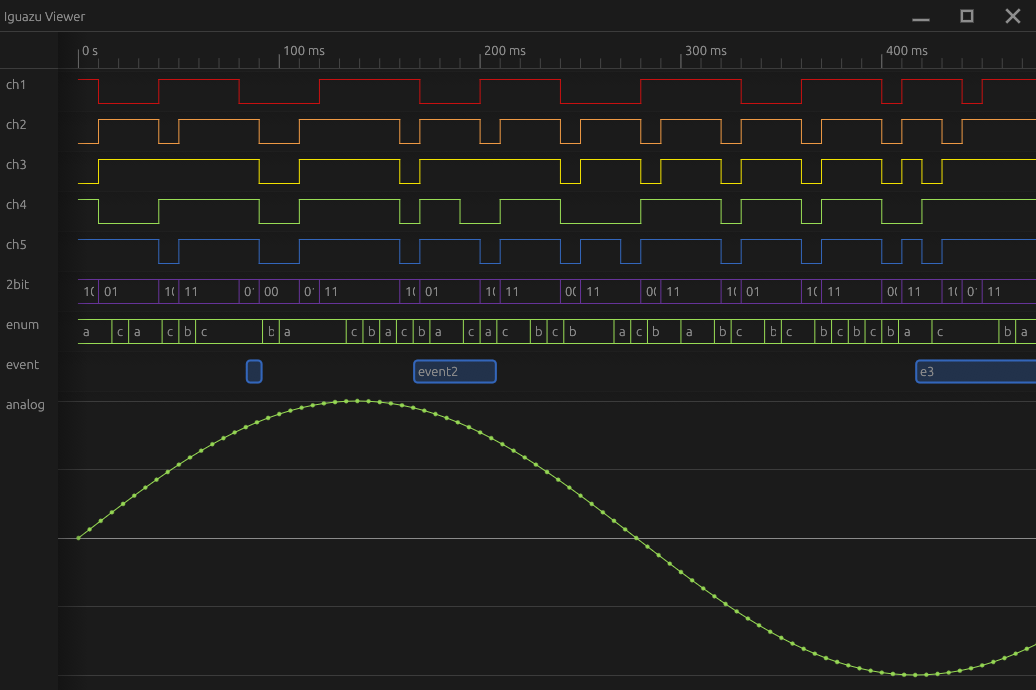
Screenshot
Key features
-
Import from CSV, Sigrok srzip, and raw binary array files. Future: JSON, WAV, SigMF, VCD, etc.
-
A native
.izs(Iguazu Signal) file format supporting compression, metadata, random access, and incremental loading from static web hosting. -
Streamabstraction layer for linear or random access to blocks of raw samples in memory, on disk, or from a remote server -
Schema layer for interpreting raw samples as bit structs, fixed or floating point numbers, timestamps, text, enums, variable or fixed-length arrays/packets, records, and hierarchical groups.
-
Flexible metadata attributes
-
Zoomable timeline viewer with analog signal plots, digital logic traces and event spans. Future: spectrograms
-
Table view
-
Rust library, CLI, egui-based viewer app for Linux, macOS, Windows, and web
Data Model
Iguazu aims to model time series data, with a focus on embedded systems and instrumentation. Use cases include:
- Logic analyzer captures
- Analog measurements and sensor readings
- I-Q / complex samples and SDR recordings
- Decoded protocol events, messages, and packets
This document describes the semantics of the data model as well as the schema representation in JSON.
Streams
Streams are the interface to the data storage layer. They are conceptually an append-only array of 8, 16, 32, or 64-bit elements, stored in fixed-size blocks. Further interpretation of the bits within an element is left to the field types; the stream just stores them.
In the Rust implementation, streams are a trait which is implemented by multiple storage backends that can load blocks on demand. Blocks are retained by a shared cache pool, and are also reference-counted so they cannot be evicted while in use.
For streams of live data or during import, a new block is added at the tail of the stream when the prior block fills. Readers may access the partial block at the tail of the stream while it is being written, and can subscribe to be notified when new elements arrive.
In the JSON representation in .izs and .iguazu.json files, streams are represented by a stream descriptor, a JSON object pointing to the stored data and other details like compression method needed to instantiate a stream backend when the file is opened.
Entities and Fields
The schema is composed of a tree of entities and fields. Entities define the structure and relationship across multiple streams, while fields define how to interpret the bits of the elements within a single stream. Both have attached metadata attributes that configure how to interpret and display the data.

In JSON, the type property specifies one of the entity or field types. Attributes are JSON properties with keys containing a colon (:), which they use as a namespace separator.
An entity with a type that is one of the field types below is a data entity. Data entities have a data property in JSON with a stream descriptor, and are simultaneously a leaf of the entity tree and a root of a field tree containing fields for interpreting the data in the stream.
Field types
Bits
Uninterpreted binary data.
{
  "type": "bits",
  "pos": 2,
  "bits": 1
}
pos: bit offset of the field within the element (default 0)bits: bit width
Int and Signed
Integer or fixed-point number.
{ "type": "int", "bits": 8 }
{ "type": "signed", "bits": 8 }
pos: bit offset within the element (default 0)bits: bit width
Float32 and Float64
Floating point number.
{ "type": "float32" }
{ "type": "float64" }
Character
Character assumed to be ASCII or a byte in a UTF-8 sequence.
{ "type": "character" }
pos: bit offset of the field within the value (default 0)
Timestamp
Monotonic timestamp.
{ "type": "timestamp" }
Enum
Enum or tagged union.
The pos and bits properties specify the location of the tag field. The tag field as an integer is used to index into the values array of strings for the enum variant names. The optional variants map is keyed by those values, containing fields that exist only if the tag matches the corresponding value.
{
  "type": "enum",
  "bits": 2,
  "values": ["a", "b", "c"],
  "variants": {
    "a": {
      "type": "int",
      "pos": 2,
      "bits": 8
    }
  }
}
pos: bit offset of the tag field within the value (default 0)bits: width of the tag fieldvalues: names of the variantsvariants: map of variant names to child fields
BitStruct
Container for sub-fields.
Each child field specifies its own position and width. The order of the children map may influence display order but does not affect the bit layout. Fields are allowed to overlap if the same bits are to be interpreted in different ways.
{
  "type": "bitstruct",
  "children": {
    "a": {
      "type": "bits",
      "bits": 1,
      "pos": 0
    },
    "b": {
      "type": "bits",
      "bits": 1,
      "pos": 1
    }
  }
}
children: A map of child fields
Null
Field with no data; purely a place to attach attributes, such as an enum variant.
{ "type": "null" }
Entities
Other entity types are containers for multiple entities or delimit inner entities into arrays.
Group
A container for named child entities.
children- map containing child entities
The semantics of a group vary depending on the core:role and other attributes attached. With "core:role": "record", the child streams advance in lockstep, representing columnar fields of the same sequence of records or events. With "core:role": "capture", the children represent the same period in time, but not necessarily sampled at the same rate or instants. Without a role, it is merely a hierarchical container without defining the relationship between the child entities.
Tuple
Interleaved data such as audio channels, complex numbers, or event start-end spans. Element i in the inner stream corresponds to names[i % names.len()] of element i / names.len().
names- names, in order, of the interleaved elements.inner- the inner entity
FixedArray
Array data with a fixed repeating stride. Unlike a tuple, the elements are numbered instead of named. FixedArrays can be nested for multi-dimensional data such as images.
elements- stride or number of elements per arrayinner- the inner entity
VariableArray
Inner elements are delimited into variable-length lists, strings, or packets by an additional data stream containing the inner end index corresponding to each outer index.
data- a stream descriptor for the end indicesinner- the inner entity to which the delimiters apply
The data stream’s elements are the end indices into the streams in child. That is, outer element 0 contains the child elements 0..data[0] (end exclusive), outer element 1 is child elements data[0]..data[1] and so on.
String data is represented as a variable array with a character field inside.
Summaries
To enable efficient zoomed-out viewing, Iguazu supports storing a pyramid of summary streams next to a data stream, each reduced in level of detail by a successive factor of two via a reduction function:
bit_and_or- Bitwise minimum and maximum of the covered elements. Used for logic and trace views, including for sub-fields by masking the relevant bits. Interleaved min and max, sizefloor(orig / 2^L) * 2.range- Numerical minimum and maximum values of the covered elements. Used for plotting numerical data. Interleaved min and max, sizefloor(orig / 2^L) * 2.skip- First value of the covered elements. Used for a skiplist-like binary search on timestamp fields to map times to indexes, and on VariableArray delimiter streams to map inner index to outer index. Valueskip[L][i] = orig[i * 2^L]. Sizefloor(orig / 2^L).
Level 0 represents the original data. Level 1 is a 2x reduction, level 2 is a 4x reduction and so on. Summaries have a base_level to skip the most detailed summary levels which can be obtained from the original data without much overhead, and would be the largest to store.
Summaries are represented in JSON in the summaries property on an entity:
"summaries": {
  "bit_and_or": {
    "base_level": 3,
    "levels": [
      { /* data descriptor level 3, data reduced by a factor of 8 */ }
      /* ... */
      { /* data descriptor level N, data reduced by a factor of 2^N */ }
    ]
  }
}
Related data models
Apache Arrow
Iguazu’s data model is inspired by Apache Arrow, but has some significant differences due to the different objectives and relevant operations on the data they intend to store:
- Data in Iguazu is usually time ordered, and wouldn’t make sense to sort by any other key. Nor does it usually make sense to select or filter rows; if running a search you would want to see matches in context.
- Arrow supports aligned columns of tabular data only, while Iguazu groups are more flexible containers for streams at differing or non-uniform sample rates.
- Arrow’s unit of streaming data is the record batch. Record batches are variable length, but are received only once complete. For data that arrives sporadically, Arrow would require sending many small record batches to make them visible to the consumer immediately. Iguazu streams use fixed-size blocks to efficiently map between sample indices and block numbers for random access. Iguazu’s underlying array primitive is once-array, which allows incrementally sharing the buffer to consumers as it is filled, avoiding small batches or extra copies.
- Each Arrow record batch contains a copy of the schema, while Iguazu turns this inside-out by having a single entity tree containing mutable metadata along with the reference-counted pointers to streams containing the data. This makes it easier for a consumer, such as a GUI, to modify attributes in the schema.
- Arrow supports nullable columns throughout, while in Iguazu’s domain, data is not usually nullable.
- Iguazu is able to describe fields for interpreting data within a value at the bit level.
SigMF
Iguazu’s set of attributes are inspired by SigMF and its extensions. While a limited number of attributes are currently specified, the goal is to add more attributes such that SigMF metadata can be imported and exported losslessly.
The .iguazu.json “Virtual” format is a similar mechanic to SigMF in attaching metadata to adjacent flat files of samples. The .izs format goes further than SigMF .tar.gz datasets in offering a compressed container with random access.
SigMF tools that decode packets commonly write them as SigMF annotations. Iguazu supports multiple streams of typed data that should be more suitable for this purpose. Annotation attributes are not yet specified but would be intended for human-authored, mutable comments.
Vega-lite
Vega-lite and the Grammar of Graphics are an inspiration for annotating data with a mapping to visual attributes. While Iguazu currently only supports a zoomable timeline with time on the X axis, further visualizations and display options will be added.
Attributes
In the Iguazu data model, attributes are found on entities and fields to add additional metadata influencing how the data is interpreted and displayed.
core:role
Logical type that augments the entity type.
"record": Group where children represent time-aligned columns; that is, thenth element of each child series is associated with thenth element of every other child series."capture": Group where children represent independent series captured simultaneously, but not necessarily sampled at the same rate."complex": Tuple withreandimfields representing a complex number.
core:text
Text format template for records and structs.
This is a string containing {name} placeholders. For a record group or bitstruct field, the names refer to child entities / fields, which will be recursively formatted and substituted into the template. For leaf fields, the {} placeholder expands to the field-type-specific format that would otherwise have been used if this attribute weren’t present.
time:rate
Sample rate in Hz. This specifies that samples are evenly spaced in time at the specified sample rate. It is therefore mutually exclusive with time:point and time:span.
time:tick
On a timestamp, this is the tick rate of the timestamp clock in Hz, used to map from timestamp values to real time.
time:epoch
RFC 3339 timestamp representing the start time of data collection.
On a timestamp, this is the time represented by value 0.
For other entities with a time:rate this is the time of the initial sample.
time:point
On a record group, contains the name of the child field of type timestamp that holds the time of each sample for signals that are sampled at discrete points in time at a non-uniform rate.
time:span
On a record group, contains the name of the child tuple with start, end element order wrapping timestamp stream. The record represents an event with a defined start and end time.
time:display
iso: ISO 8601 / RFC 3339 absolute timestamprelative: Relative time in HH:MM:SS.sss formatraw: Integer sample number
Defaults to iso if time:rate and time:epoch are specified, relative if time:rate is specified, otherwise raw.
number:scale
Scale factor multiplied with the stored value. This is used to scale data stored in fixed-point format.
Default: 1.0
number:offset
Offset applied to the number after scaling. This is used for fixed-point representations with a bias or offset.
Default: 0.0
number:min
Logical minimum value. Used for axis bounds.
number:max
Logical maximum value. Used for axis bounds.
display:layout
Default view to display this data.
{"view": "timeline"}{"view": "table"}
display:color
Accent color to distinguish this entity from others. Used as the color of the line or other timeline mark.
neutral(White / Black depending on theme)brownredorangeyellowgreenbluepurple
display:timeline:row
How this entity should be displayed on the timeline.
hiddenstack: Children are displayed as separate timeline rows.yaxis: Analog Y axis. If applied to an entity with children, the children are plotted on a shared Y axis.trace: A row showing contiguous runs of the same value with the value displayed as text.logic: Single-bit value displayed as a logic trace.events: Each value is displayed as a discrete event.
Import and Export Formats
Importers open an input file and produce an Iguazu entity tree and streams. Some importers parse and copy the data to streams created in a default storage backend, while others create streams with a storage backend that loads data lazily from the source file. Importers load a schema provided in the file, or infer the schema from the file contents. If a different schema is provided on the command line, some importers can parse the file according to that schema rather than the inferred one.
An importer and its options can be specified on the command line with the -f format:option1=value1:option2=value2 syntax.
In the GUI, the options are prompted after opening a file.
Raw (raw)
Array of raw samples in a file.
A schema is generated from the dtype and sample_rate options. If a schema is provided, those options are ignored. The schema must be a single data entity (containing arbitrary fields), or a tuple wrapping a single data entity.
Files with the following extensions are detected by this importer, with corresponding default option values:
.bin, .f32, .cf32, .cfile, .u8, .u16, .u32, .u64, .s8, .s16, .s32, .s64, .cu8, .cu16, .cu32, .cu64, .cs8, .cs16, .cs32, .cs64, .logic8
The data is loaded from the file lazily as needed.
Import options
bits: Element size in bits (8, 16, 32, 64)dtype: Data type (“b” | “binary”, “l” | “logic”, “u” | “unsigned”, “s” | “signed”, “f” | “float”, “cu” | “complex_unsigned”, “cs” | “complex_signed”, “cf” | “complex_float”)sample_rate: Sample rate.offset: Byte offset in the file where the data starts. Default 0.count: Number of elements to read from the file. Empty means to read until the end of the file.block_size: Number of elements to read in each block.
CSV / TSV (csv, tsv)
The ubiquitous tabular data format.
Data is parsed into streams in the default storage backend.
Iguazu can infer a schema for columns containing:
- ISO 8601 absolute timestamps
- Relative timestamps (detected in the first column or a column named
t,time, ortimestamp, containing monotonically increasing values) - Numbers as float32
- Enums (detected when all values <= 15 characters, fewer than 32 distinct values)
- Strings (fallback if none of the heuristics match)
If a schema is provided, the columns will be parsed according to the schema for supported types.
It’s recommended to use iguazu schema file.csv > schema.json to infer a schema, review and edit it, then pass -s schema.json to further commands to ensure you get a consistent schema.
Import options
delimiter: Delimiter byte, defaults to,for CSV and\tfor TSV.terminator: Record terminator byte. If empty, either\nor\r\nis accepted.quote: Quote byte. Empty ornonedisable quoting.escape: Escape byte before quotes. Empty ornonedisable escaping.double_quote: Whether to interpret doubled quote characters as an escaped quote.comment: Comment byte. If specified, lines beginning with this byte will be skipped.skip: Number of lines to skip before reading headers.columns: Comma-separated list of column names in place of the header line. If empty, the first line of the file (after skip) is used as a header.
Sigrok srzip v2 (sigrok)
The zip-based file format from Sigrok and PulseView.
Detected from a .sr file extension.
The schema is generated from the digital and analog channels in the file metadata and cannot currently be overridden.
izs (izs)
The native Iguazu Signal format.
The schema comes from the file and currently cannot be overridden. The data is loaded and decompressed lazily as needed.
Virtual (virtual)
An .iguazu.json JSON file containing a schema along with references to data in a flat file or stored inline.
Inspired by GDAL’s VRT.
The Iguazu .izs file format
Design Goals
- Container for multiple streams of timeseries data including analog and digital waveforms and events with extensible metadata following the Iguazu data model
- Multiple compression options optimal for different data types
- Efficient random access via HTTP range requests
- Sufficient performance to read and write in real time on low-end / embedded hardware
- Write in a single pass for generation during streaming upload
Specification
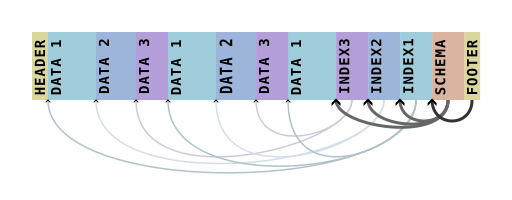
An .izs file is read starting with the footer at the end of the file. Immediately prior to the footer, the metadata block contains the schema along with pointers to per-stream indexes. These indexes hold the pointers to each data block of the stream.
Header
The file begins with the 8 byte header
0x00, 0x21, 0x4a, 0xd9, 0xff, 0x90, 0xba, 0xed
This header is not needed to read the file, but exists to allow identification of the file format.
Data blocks
The bulk of the file consists of stream data in compressed blocks. Each block represents a fixed number of elements from one stream, but is variable-length as stored due to compression. Only the final block of each stream may be shorter than the block size. The block offsets and sizes within the file are located via references in the block index.
Each block is individually compressed with a method specified in the metadata.
Compression methods
none: array of little-endian elements is stored directly without compression.zstd: array of little-endian elements is compressed with Zstandard.- Future: Investigate pcodec
Block index
Each stream has one block index containing the positions and compressed sizes of all of that stream’s data blocks.
The block index must come after all data blocks of that stream. Normally all block indexes are at the end of the file, just before the metadata, but it is permitted to interleave block indexes with data blocks of other streams, as may occur when appending data to an existing file.
The format and compression of the index block is specified in the i_compress field in the schema:
none: uncompressed array of 64-bit little endian offsets, followed by an array of 32-bit little endian sizes.- Future: pcodec
Schema
The schema at the end of the file is Zstandard-compressed JSON.
The top-level object has an "entity" property containing the JSON encoding of the Iguazu schema format. Each data stream entity within the entity tree has a "data" property, which is a stream descriptor referring to the data of the stream. The JSON object has properties:
element:"u8","u16","u32","u64"representing the bit width of each element.i_offset: Integer offset of this stream’s block index in bytes from the start of the file.i_size: Integer size in bytes of the block index after compression.i_compress: Compression format for the block index. See the Block index section for definitions.block: Count of elements per block. This should be a power of 2 and greater than or equal to 4096.compress: Compression method used for data blocks. See the Data blocks section for definitions.end: Total number of elements in the stream.
An example schema for a file containing two logic analyzer channels:
{
  "entity": {
    "type": "bit_struct",
    "children": {
      "sda": {
        "type": "bits",
        "bits": 1,
        "display:color": "neutral"
      },
      "scl": {
        "type": "bits",
        "pos": 1,
        "bits": 1,
        "display:color": "brown"
      }
    },
    "time:rate": 8000000.0,
    "data": {
      "element": "u8",
      "block": 1048576,
      "compress": "zstd",
      "i_offset": 16612,
      "i_size": 156,
      "i_compress": "none",
      "end": 13348017
    },
    "summaries": {
      "bit_and_or": {
        "base_level": 2,
        "levels": [
          {
            "element": "u8",
            "block": 1048576,
            "compress": "zstd",
            "i_offset": 16336,
            "i_size": 84,
            "i_compress": "none",
            "end": 6674008
          },
          {
            "element": "u8",
            "block": 1048576,
            "compress": "zstd",
            "i_offset": 16420,
            "i_size": 48,
            "i_compress": "none",
            "end": 3337004
          },
          // more levels omitted
        ]
      }
    }
  }
}
Footer
The file ends with a 16 byte footer.
- Bytes 0-4: little-endian integer: compressed length of the schema immediately preceding the footer.
- Bytes 4-8: reserved. Must be
0. - Bytes 8-16: bytes
0x01, 0x21, 0x4a, 0xd9, 0x01, 0x90, 0xba, 0xed
Checkpoints
Because the footer, schema, and indexes are placed at the end of the file, a truncated file is unusable. To minimize data loss after unexpected interruption during long-term data collection, a to-be-defined extension will allow periodically checkpointing the unwritten partial data blocks, block indexes, and schema in a separate file that can be merged with the main data file when recovery is necessary.
Command-Line Help for iguazu
This document contains the help content for the iguazu command-line program.
Command Overview:
iguazu
Usage: iguazu <COMMAND>
Subcommands:
info— Describe the entities in the fileschema— Dump the schema as JSONconvert— Convert between formats
iguazu info
Describe the entities in the file
Usage: iguazu info [OPTIONS] [FILENAME]
Arguments:
<FILENAME>— Input filename
Options:
-f,--format <FORMAT[:OPTION=VALUE:OPTION=VALUE...]>— Input format and:separated options (if not specified, inferred from filename)-s,--schema <SCHEMA>— Schema override from file-e,--entity <ENTITY>— Select an entity by path within the file
iguazu schema
Dump the schema as JSON
Usage: iguazu schema [OPTIONS] [FILENAME]
Arguments:
<FILENAME>— Input filename
Options:
-f,--format <FORMAT[:OPTION=VALUE:OPTION=VALUE...]>— Input format and:separated options (if not specified, inferred from filename)-s,--schema <SCHEMA>— Schema override from file-e,--entity <ENTITY>— Select an entity by path within the file
iguazu convert
Convert between formats
Usage: iguazu convert [OPTIONS] [FILENAME] [OUT_FILENAME]
Arguments:
<FILENAME>— Input filename<OUT_FILENAME>
Options:
-f,--format <FORMAT[:OPTION=VALUE:OPTION=VALUE...]>— Input format and:separated options (if not specified, inferred from filename)-s,--schema <SCHEMA>— Schema override from file-e,--entity <ENTITY>— Select an entity by path within the file--build-summary— Build default summary of all entities-F,--out-format <OUT_FORMAT>
This document was generated automatically by
clap-markdown.